Reads the room.
Brief webcam samples measure relative image brightness. Choose a faster response or a longer sampling interval.
 DimYourMini
Your room changes.
Your screens follow.
Your room gets darker. Your monitor keeps shining. Sound familiar?
DimYourMini uses your webcam to read changes in light and adjusts your external displays through BetterDisplay. Native Swift. Local processing. One less slider to babysit.
Meet the appBrief webcam samples measure relative image brightness. Choose a faster response or a longer sampling interval.
External displays are detected and enabled by default. Switch any one to manual control without stopping the others.
No saved photos or video. No microphone. No accounts or app analytics. Camera frames are processed in memory.
Real readings. A clear view of every display.
And an off switch wherever you need one.
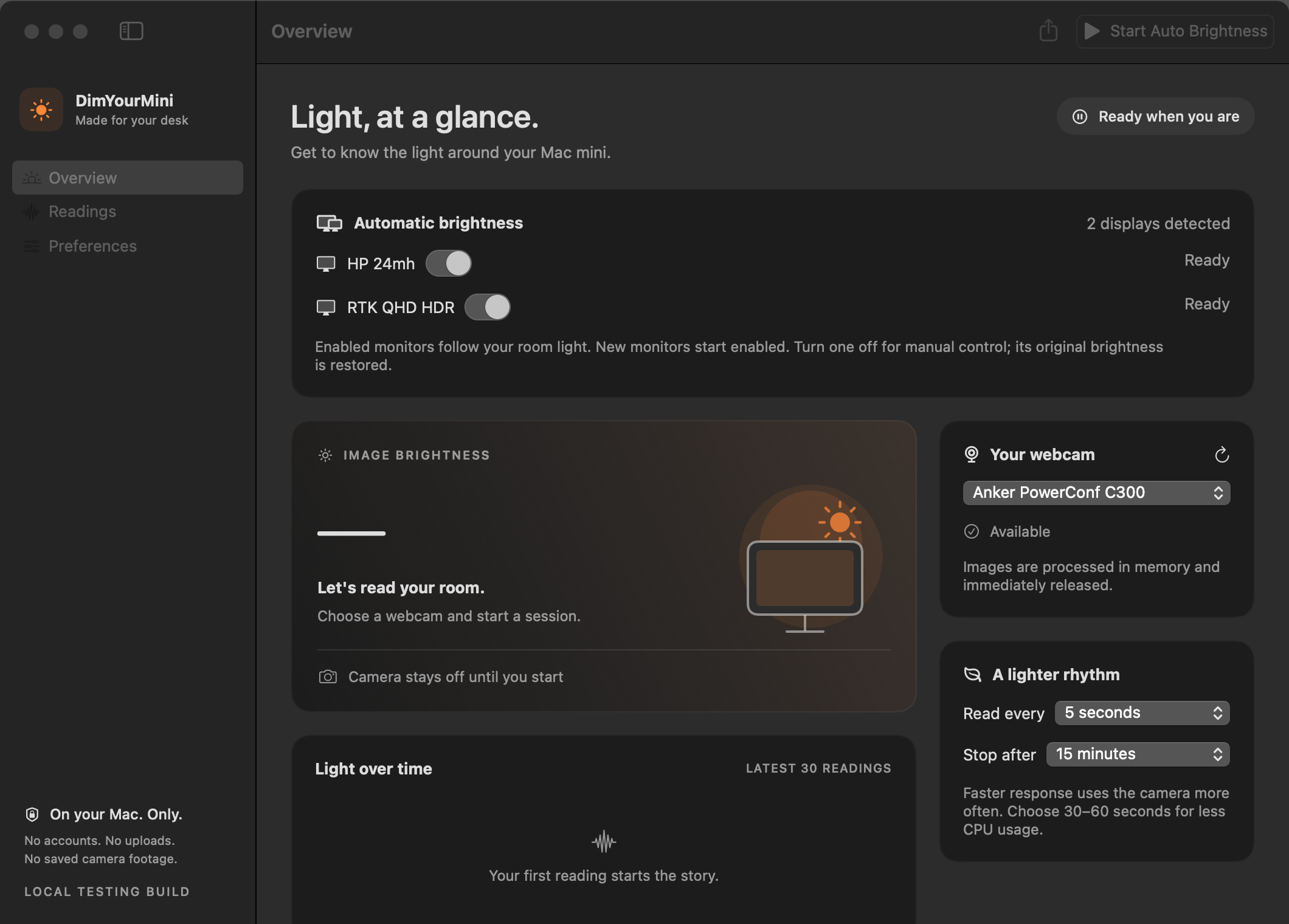
Start once. Let it follow the light.
Stop to restore each display's original brightness.
5, 15, 30 or 60-second sampling intervals.
Faster sampling uses the camera more often.
Connect a webcam that macOS recognizes. Open BetterDisplay so the app can reach your monitor's brightness controls.
Start at a brightness you like. Give camera permission when you start; the first reading becomes the light reference for each enabled display.
Your enabled monitors follow. Prefer one screen unchanged? Switch it off in the app. Optional dim/bright calibration gives you more control.
SHA-256 available with this buildYes. This build uses BetterDisplay's local CLI integration to read and change display brightness. Install and open BetterDisplay separately; it isn't bundled, and its own license terms apply. Follow the setup guide with real app screenshots ↗.
The app uses macOS camera APIs, but this beta has been tested primarily with an Anker PowerConf C300. Other cameras may behave differently or be unsupported. Camera auto-exposure, what appears in the frame, and monitor light can affect the reading. This is relative image brightness, not a lux meter.
The webcam opens briefly for each sample, then its worker process exits. You'll see the camera indicator during capture. Longer intervals reduce how often it opens. Pause the app when using a video call; meeting compatibility hasn't been fully validated.
The app attempts to restore that display's original brightness. A disabled display then stays under manual control. Normal Stop and Quit also attempt restoration. Force quitting, a crash, unplugging the monitor, or stopping BetterDisplay can prevent restoration.
This download is built for Apple silicon Macs only. It requires macOS 14 or later. An Intel build isn't included.
The app processes frames in memory and doesn't save or upload photos or video, access the microphone, or include app analytics. Numeric readings can be exported locally if you choose. This website doesn't request camera access or use analytics scripts; Cloudflare provides its hosting and standard request handling.